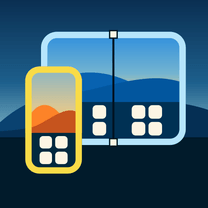
Hybrid LauncherAndroid
Home screens the way you want them.
Keep one layout on every screen, and your icons and widgets stay on their page when you fold or turn your phone. Or, with the paid Plus upgrade, give each screen its own layout.
Keep your screens in sync, or keep them separate.
Keep all three screens in sync with one layout. Or, with the paid Plus upgrade, keep them separate: the inner screen gets its own layout upright, in landscape, or one for each.
Hybrid Launcher NorrskenHybrid LauncherNorrskenHybrid LauncherNorrsken
 Get it on Google Play
Gestures from the edges, in every app.
The side handles, the bottom band and the folders: each picture shows what it does. Nothing to read. The handles and the band come with Plus.
Get it on Google PlayThe same home, a new launcher.
From Nova, Lawnchair or Octopi: a backup from there is all it takes. Pages, folders, the dock and the widgets' places come along. Step by step.
Nova Settings > Backup & restore > Backup
Lawnchair Settings > Backup
Octopi Settings > Backup settings
Get it on Google PlayLive wallpapers. You pick the weather.
27 scenes of Swedish nature. Snow, rain, fog, northern lights - each effect in three levels, where it fits the scene. The same scenes as in Norrsken.
Hybrid LauncherNorrskenGet it on Google PlayWhy Hybrid Launcher?
Fold it, unfold it, turn it: nothing moves.
Your icons and widgets stay on their page. Keep your screens in sync with one layout, or, with Plus, keep them separate. You choose, and a new layout starts as a copy of the cover screen's.
Gestures and quick tools in every app.
Handles at the edges and a band at the bottom: back, home, recents, any app or shortcut, with one hand. A side stroke can open a panel for brightness, volume, the flashlight and a screenshot. Both come with Plus.
Your home from Nova, Lawnchair or Octopi.
A backup from there is all it takes: the pages, the folders, the dock and the widgets' places come along.
No ads. No tracking. No account.
Your layout, your apps and your settings stay on your phone, and the launcher sends none of them anywhere. We make everyday apps for everyday people, and what is on your phone is yours.
27 live wallpapers, and you pick the weather.
Calm scenes of Swedish nature, each drawn for the cover screen and for the open one, with snow, rain, fog or northern lights where they fit.
Get it on Google PlayFree to use. Hybrid Launcher Plus adds the gestures, the quick tools and more - monthly, yearly or once for life, with 7 days free on the subscription. Terms of Service
Questions and answers.
Can I have a different home screen on the cover screen and the inner screen?
Yes, with Plus. Give the inner screen its own layout upright, in landscape, or one for each. A new layout starts as a copy of the cover screen's, so you don't have to set it up from nothing. Without Plus, every screen stays in sync with one layout.
What happens to my icons and widgets when I fold or unfold?
Nothing moves. With one layout, the inner screen shows two of the cover screen's pages side by side, so every icon and widget stays on its page. A screen with its own layout keeps its own places.
How is this different from One UI with cover screen mirroring off?
With mirroring off, One UI keeps two homes that you set up and keep in order one by one. Hybrid Launcher keeps every screen in sync with one layout unless you give a screen its own, which starts as a copy. The live wallpapers come in the same app, and with Plus so do the edge gestures and the tools panel.
Can I bring my layout from Nova, Lawnchair or Octopi?
Yes. Make a backup in the launcher you use now and open it in Hybrid Launcher: the pages, the folders, the dock and the widgets' places come along. Each widget is set up again with a tap. Step by step.
Does it show ads or collect anything?
No. No ads, no tracking, no account. Your layout, your apps and your settings stay on your phone, and a backup is a file you make and keep yourself. If you buy Plus, the app checks the purchase with our server, which keeps nothing.
Do the edge gestures work in every app, and what do they need?
Yes, over every app, with Plus. They need Hybrid Launcher's accessibility service, which you turn on in Android's settings: it cannot read what is on the screen, and it acts on nothing but the strokes that start on its handles. The tools panel also asks to modify system settings, for brightness and auto-rotate.
What is free, and what does Plus add?
Free: every screen in sync with one layout, the drawer, folders, widgets, the dock, icon packs, your home from Nova, Lawnchair or Octopi, backups and the 27 live wallpapers. Hybrid Launcher Plus adds the edge and bottom gestures, the quick tools panel, swipes on icons, a new icon for one app, notification badges, choosing which apps are hidden, its own layout for each screen, and widgets that overlap or fade. It is monthly, yearly or once for life, and the subscription starts with 7 days free. If Plus ends, nothing is lost: its settings come back when Plus does.
How fast is it?
Home is native Android code, written in Kotlin, and what uses power is your choice: the live wallpapers and the edge gestures are optional, and a moving wallpaper is what uses power while it shows.
Is Hybrid Launcher built on another launcher?
No. It is written from the ground up in Kotlin, not built on another launcher's code.
Which phones does it run on?
It is made on and proven on the Samsung Galaxy Z Fold 8, with Android 12 or later. Other phones and tablets will be named here as each one is tested.
Where do I get it, and who makes it?
On Google Play. It is made by Luwall Studios in Sweden, who also make Avgångar and Norrsken: everyday apps for everyday people.
How the other launchers treat the two screens, with sources: Which launcher for the Galaxy Z Fold 8?
Watch your apps stay put when you fold, and two more things it does: Three short films
Hybrid Launcher
A launcher that lets you choose: one layout that stays put when you fold your phone, or, with the paid Plus upgrade, one for each screen.
Get it on Google PlayUpdated 14 October 2026